Microsoft 365 already contains a Copilot readiness assessment, it is free, it sits in the admin centre under Reports, and most organisations pay somebody to run one instead. The built in report is worth running first, but it measures application activity rather than data risk, so a tenant can score perfectly on it and still be the wrong place to switch Copilot on. This is what each column actually means, the one limitation that arrives at the worst possible moment, and the four checks the report cannot make.
Permissions are the part that decides how a rollout goes, and they are not in the report at all, which is why the controls that limit what Copilot can surface belong in the same piece of work as the licence count. Every figure, column definition and portal path below was verified against Microsoft Learn on 8 September 2026.
What the Copilot readiness assessment in the admin centre shows
The report lives at Microsoft 365 admin center > Reports > Usage, then under Reports select Microsoft Copilot and then Copilot. It opens on the Readiness tab, with a second Usage tab carrying the adoption metrics. The readiness view analyses the previous 28 days. Microsoft’s own reference for it is the Microsoft Copilot Readiness Report documentation, and it is worth reading alongside the report rather than after it.
Availability is the first thing to plan around. Microsoft documents the report as available within 72 hours, with usage data carrying up to 72 hours of latency, and a daily validation pass over the previous three days that fills any gaps it detects. The wider usage reports guidance is looser still, stating that reports typically become available within 24 to 72 hours but might sometimes take several days. If you assign a batch of licences on Monday afternoon and open the report on Tuesday morning to check the assignment landed, the report is not the tool for that job.
Four summary figures sit above the user table:
- Total Prerequisite Licenses, defined by Microsoft as the sum of all users who have at least one licence assigned to them or who can be assigned a licence.
- Users on an eligible update channel, meaning Current Channel or Monthly Enterprise Channel.
- Assigned Licenses, the users who already hold a Copilot licence.
- Available Licenses, the users who do not.
Read the first of those carefully. It counts people who can be assigned a licence, so it is an entitlement ceiling rather than a headcount of prepared users. Quoted into a business case as the number of people ready for Copilot, it overstates by however many unassigned seats the tenant is carrying.
Nine directory roles can open the usage reports: Global Administrator, Exchange Administrator, SharePoint Administrator, Usage Summary Reports Reader, Reports Reader, Teams Administrator, Teams Communications Administrator, User Experience Success Manager and AI Administrator. Two of those, Usage Summary Reports Reader and User Experience Success Manager, see the reports with no user details at all. Microsoft’s own summary page for Copilot admin reports names only AI Administrator against the readiness report, which is the tidier answer and the less complete one. Plan against the longer list, because the person who ends up running this in practice is usually already a Reports Reader.
Why the first run looks broken, and is not
By default, user specific information such as usernames, display names, groups and sites is hidden in usage reports. The setting is a single checkbox, Conceal user, group, and site names in all reports, at Settings > Org Settings > Services > Reports. Only a Global Administrator can change it, and it can also be set through the Microsoft Graph adminReportSettings resource. Changes take effect within a few minutes.
So the first time anybody opens the readiness report they usually see a table of pseudonyms and conclude the report is faulty. It is working exactly as configured. What matters is that turning concealment off is a tenant wide decision affecting every usage report and every person who can read one, not a per report toggle, and it should be made deliberately rather than in the middle of a demonstration.
Reading the columns without over reading them
The per user table is where the readiness claim is actually made, and the definitions are worth putting next to the numbers.
| Column | Microsoft’s definition | What it establishes |
|---|---|---|
| Has Copilot license been assigned | Yes or No, whether the user has a Copilot licence assigned | Assignment. Not activation, and not use. |
| Uses eligible update channel | Whether devices are configured to get the latest or monthly updates | Channel membership. Not the build actually installed on the device. |
| Uses Teams Meetings | Attended at least one meeting using Teams in the past 30 days | One meeting in a month. |
| Uses Teams chat | Participated in at least one chat using Teams in the past 30 days | One chat in a month. |
| Uses Outlook Email | Sent at least one email using Outlook in the past 30 days | One sent message in a month. |
| Uses Office docs | Collaborated on at least one document or file using OneDrive or SharePoint in the past 30 days | One collaboration event in a month. |
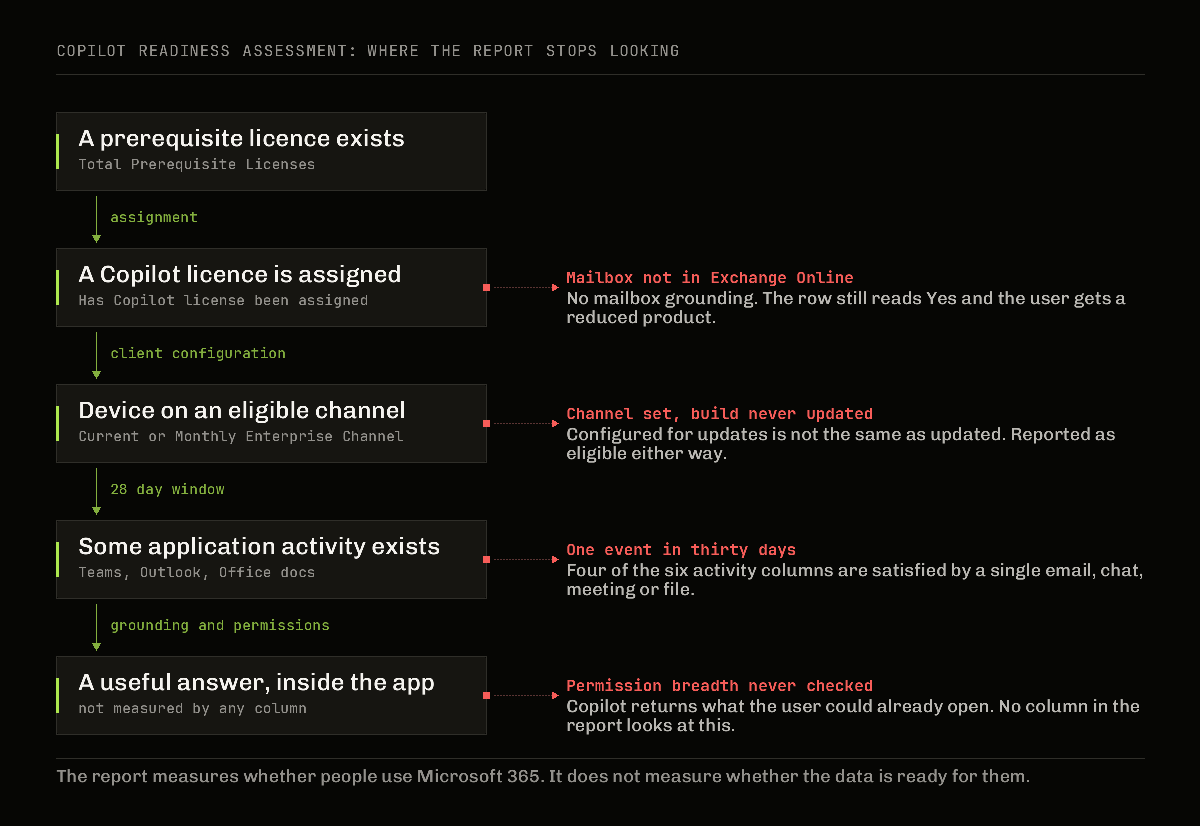
Four of those six thresholds are one event in thirty days. A person who sent a single email, attended a single meeting and opened a single shared file reads identically to a person who lives in Outlook from seven in the morning. That is entirely reasonable for the purpose Microsoft states, which is sizing a population and suggesting candidates. It is not reasonable as evidence that a department is ready, and the difference gets lost the moment the table becomes a green tick in a slide.
The update channel column has a similar softness. It reports the channel a device is configured for, not the version it is running. A device parked on Monthly Enterprise Channel that has not successfully updated for eight months is a Yes.
The suggested candidate column, and when it arrives
The most useful column in the report is also the most easily misread. Microsoft describes Suggested candidate for Copilot as flagging the top 25 per cent of nonlicensed users each week, based on app usage intensity in the applications where Copilot adds value, naming Outlook, Teams and Word. Four statements from the documentation change how it should be used.
First, and this is the one that matters most: the feature is only available to customers who purchase Microsoft Copilot licenses. The column that would most help an organisation decide who to buy for does not exist until it has bought. A genuine pre purchase Copilot readiness assessment therefore cannot use it, which is a large part of why an industry of paid assessments exists at all. That is an honest point in the vendors’ favour and it is worth saying plainly.
Second, the feature doesn’t rank users within the selected 25% group; there’s no individual stack ranking among suggested candidates. It is a set, not an ordering. Sorting the exported column and taking the top fifty rows is sorting on nothing.
Third, the selection is recalculated weekly over the preceding 28 day period, licensed users are removed from consideration, and Microsoft states that over time every eligible user in the organisation can be flagged as a suggested candidate. Being flagged is not a scarce signal. Run the report for six months and the flag walks around the whole organisation.
Fourth, Microsoft says directly that this data is not intended to be used to evaluate employee performance. Put that sentence in the document before the export goes anywhere near a manager, because a spreadsheet of named people ranked by application intensity is exactly what it will look like once concealment is switched off.
Four things the readiness report does not measure
Everything above is worth having and none of it touches the four questions that decide whether switching Copilot on is a good idea this quarter.
Who can already see what. Copilot answers within the permissions the person already holds, which means a rollout does not create exposure so much as remove the friction that was hiding it. Nothing in the readiness report looks at permission breadth: not Everyone Except External Users on a site nobody remembers creating, not a project site whose membership grew for two years and never shrank, not a OneDrive with a link shared organisation wide in 2023. This is the entire risk and it is invisible to the report. The controls that address it, and the important distinction between the ones that hide content and the ones that change access, are covered separately in the Copilot oversharing controls that actually work and in the data loss prevention posture to fix before rollout.
Where the mailbox is. Microsoft’s requirements page for Copilot states that Copilot supports primary mailboxes hosted in Exchange Online, and that an Exchange Online mailbox is required for any experience that uses email, calendar, meeting or other mailbox data. A mailbox that has not moved yet therefore does not stop the licence working: it removes every mailbox grounded feature the licence was bought for. There is no mailbox location column in the readiness table. In a partly migrated organisation, a user whose mailbox has not moved shows the same row as everybody else, receives a licence, and gets a materially worse product with no explanation available to the service desk.
Whether the content is worth grounding on. Sensitivity labels, retention, duplicated document sets, five year old policy documents that were never superseded and are still the most linked file in the site. The report has no view of any of it. Copilot will happily summarise the wrong version of a document with total confidence, and the guardrails for that are label and lifecycle work, not licence work. The practical shape of that is in prompt patterns that respect Purview.
Whether the client can reach the service. The same minimum requirements page lists modern browsers with third party cookies enabled for the online apps, network endpoints and WebSocket connections that must not be blocked, and mobile floors of iOS 16.0, iPadOS 16.0 and Android 10. None of that appears in the readiness columns. A tightly filtered proxy produces a Copilot that is licensed, on an eligible channel, and inert, which presents to the user as the product being broken. What the assistant can and cannot reach is worth understanding in advance from how Microsoft 365 Copilot Chat is actually put together.
Readiness and entitlement are different questions, and the second is easy to get wrong in both directions. The prerequisite list is far wider than E3 and E5, while the add-on stops short of agents that read tenant data: which plans qualify for Copilot, and what bills on top.
The newsletter
Get the next Copilot fix like this one by email
Subscribe and get the free 8-page Intune troubleshooting field guide (PDF), then new fixes about twice a month. From a Microsoft MVP.
The Copilot Dashboard is a different instrument
Sooner or later somebody compares the admin centre report with the Copilot Dashboard in Viva Insights and asks which one is wrong. Microsoft’s answer, in the Copilot Dashboard documentation, is that both draw on the same underlying data set but are intended for different audiences, and the differences are structural rather than faults.
| Admin centre report | Copilot Dashboard | |
|---|---|---|
| Audience | IT administrators | Leaders, decision makers, managers |
| Window | Rolling 7, 30, 90 or 180 days | Previous 28 days |
| Delay | Within 72 hours | Up to six days |
| Aggregation | Per user table available | Aggregated to a minimum privacy threshold |
Several thresholds are worth knowing before promising anyone a dashboard. Data processing does not start until the tenant has a minimum of 50 assigned Viva Insights licences, or one assigned Copilot licence including the Viva Insights service plan, and then takes up to seven days. Below 50 Copilot licences the dashboard offers readiness, adoption and impact, plus Copilot and Copilot Chat insights; agent insights, benchmarks, week and month trendlines, delegation and the group level view for managers all require 50 or more. The satisfaction rate only appears when there have been at least 30 feedback responses from at least five unique users in the rolling 28 day period. Automatic access is granted through the Entra ID manager hierarchy and needs a tenant with at least 2,500 users. In a Privileged Identity Management enabled tenant, Microsoft notes that global administrators might not have access at all.
Two counting details explain most of the arguments. Tenant level figures for Copilot licences assigned and active Copilot users include disabled mailboxes, while the group level equivalents do not. And a day level export run within two days of a licence assignment or removal will not reflect that change.
One number deserves a warning. The dashboard reports Copilot assisted value using a default rate of 72 US dollars per hour applied to estimated assisted hours. That is a configurable assumption multiplied by a modelled estimate, and it will be screenshotted into a board pack within a week of anybody finding it. Say the rate out loud whenever the figure is shown, and treat the result the way any claim about Copilot returning value deserves to be treated.
A Copilot readiness assessment worth running, in order
Cheapest first, because the cheap checks eliminate the most people.
- Run the built in report. It costs nothing, it lands within 72 hours, and it sizes the population and finds the update channel problem without a single meeting.
- Decide the concealment setting deliberately. Either accept pseudonyms and work at the aggregate level, or turn concealment off knowing it applies to every usage report in the tenant. Do not discover this halfway through a workshop.
- Check mailbox location for the proposed pilot group. Anyone whose primary mailbox is not in Exchange Online is not a pilot candidate, whatever the readiness row says.
- Measure permission breadth before buying licences. Site inventory, Everyone Except External Users usage, organisation wide sharing links, and the sites that would be first into a Copilot answer. This is the long pole and it is the reason to start early.
- Prove the network path. Endpoints, WebSocket connections and third party cookies on the proxy and browser build the pilot group actually uses, not on a test laptop.
- Then pick people. Pick by job shape, meeting load and document dependence, and use the suggested candidate column as a cross check rather than as the selection.
The failure modes
Every name in the report is a code. Concealment is on by default. Settings, Org Settings, Services, Reports, and only a Global Administrator can clear it.
The report and the Copilot Dashboard disagree. Different windows, a 72 hour delay against up to six days, different aggregation, and disabled mailboxes counted at tenant level but not at group level. Both can be correct at once.
The suggested candidate column is missing. It is only available to customers who purchase Copilot licences.
Everyone is eventually a suggested candidate. Documented behaviour. The weekly recalculation removes licensed users and reconsiders the rest, so over time every eligible user can be flagged.
A licence assignment does not show in an export. Day level exports run within two days of the change will not reflect it.
A licensed user says Copilot cannot see their email. Check where the primary mailbox is. On premises and hybrid mailboxes do not support mailbox grounding, and no amount of licence troubleshooting will change that.
A global administrator cannot open the Copilot Dashboard. In a Privileged Identity Management enabled tenant, Microsoft states this can happen.
The organisation scores well and the pilot goes badly anyway. The report never claimed to measure permissions, labels or content quality. It measured whether people use Microsoft 365, and they do.
What I would do differently
My tenant is a lab with no enrolled devices and no Copilot estate to speak of, so I have no adoption curve to show and I am not going to invent one. What the documentation supports is still worth stating.
Run the free report before accepting a proposal for a paid Copilot readiness assessment. It will not answer the security question, but it converts the conversation from whether the organisation is ready into which few hundred of several thousand people should go first, and that is a better conversation to be having with a partner rather than at one.
Treat the permission work as the project and the licence work as the easy part. The uncomfortable truth of a Copilot rollout is that nothing new is exposed. Everything Copilot returns was already readable by the person who asked. What changes is that finding it stops requiring intent, patience and knowing the site name.
Write the column definitions on the slide. Uses Outlook Email means one sent message in thirty days. Once that sentence sits next to the percentage, nobody mistakes activity for readiness, and the number stops being used to close arguments it cannot settle.
Never present assisted value as measured. State the rate, state that it is an estimate of hours multiplied by an assumed hourly figure, and let the audience apply their own. A defensible small number survives contact with a finance director. An impressive large one does not.
And put the performance sentence in writing early. Microsoft says the suggested candidate data is not intended to evaluate employee performance. That protection is only worth anything if it is recorded before somebody exports the table with real names in it.
Last verified: 8 September 2026.