A full install, 120 uploads and a machine-learning run on a laptop-class box. Immich v3.1.0 never wobbled. It is also not the lightweight photo app the name suggests.
- 24.4s
- Cold start
- 5.01
- Assets per second
- 2.42GiB
- Idle memory
- 743.7%
- Peak ML CPU
How this was tested
Everything below came off one machine: an i5-10210U with four cores and eight threads, 7.62 GiB handed to Docker Desktop 29.6.2 on the WSL2 backend.
The 120-image library was generated locally rather than lifted from a real photo collection. Correct resolutions from 1920×1080 up to 6000×4000, with genuine EXIF: camera make and model, exposure, ISO, focal length, timestamps, and GPS across five cities.
That gives trustworthy figures for upload speed, indexing cost, CPU load and storage overhead. It tells you nothing about face recognition, because synthetic landscapes contain no faces.
Installation
Two downloads and one command. It works, and it is quick.
- 167.2s
- Cold image pull
- 3.9s
- up -d returns
- 24.4s
- API responding
- 33s
- All containers healthy
The first-boot log looks alarming and is not. Warnings that the smart_search and face_search tables do not exist, and that relation "system_metadata" does not exist, are simply migrations that have not run yet.
Two traps on Windows
The stock .env sets DB_DATA_LOCATION=./postgres. On Docker Desktop for Windows that resolves to a Windows path, and Postgres initialises with --data-checksums, which needs Unix ownership semantics that the path cannot provide.
So the database has to move into a named volume. That volume then has to be declared, because the official compose file does not declare it.
# Verified on Windows 11 + Docker Desktop 29.6.2 (WSL2), 9 Aug 2026
# Without this declaration Compose fails with an undefined-volume error
volumes:
  model-cache:
  immich_pgdata:
Machine learning will take every core you own
This is the number that matters.
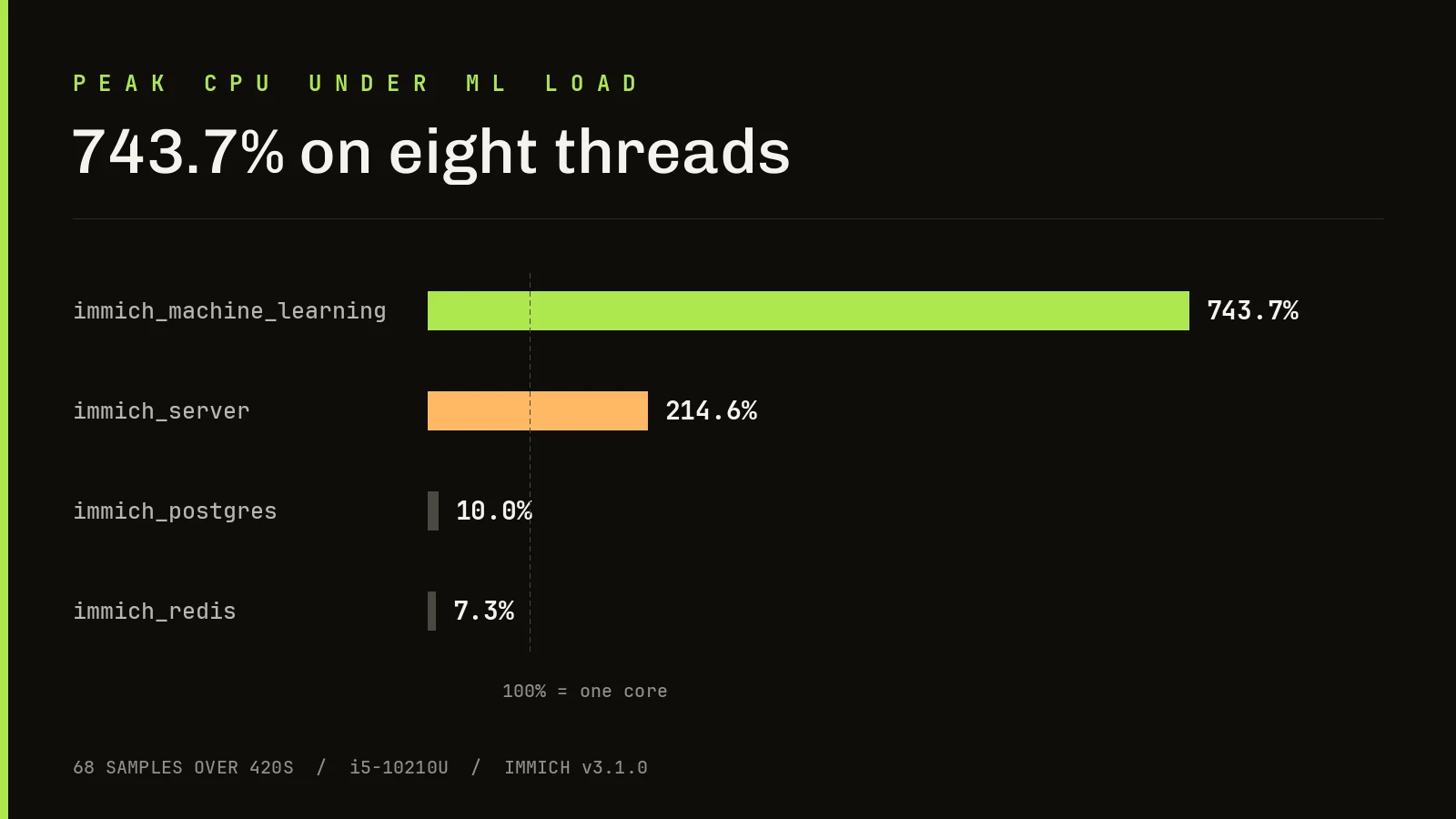
Sampled every four seconds across 420 seconds while the backlog processed, the ML container peaked at 743.7% CPU on an eight-thread chip. The stack as a whole hit 827%.
On a machine you also use for other things, you will notice. If Immich shares a box with anything latency-sensitive, cap it with Docker resource limits on day one rather than after the first complaint.
What it costs at rest
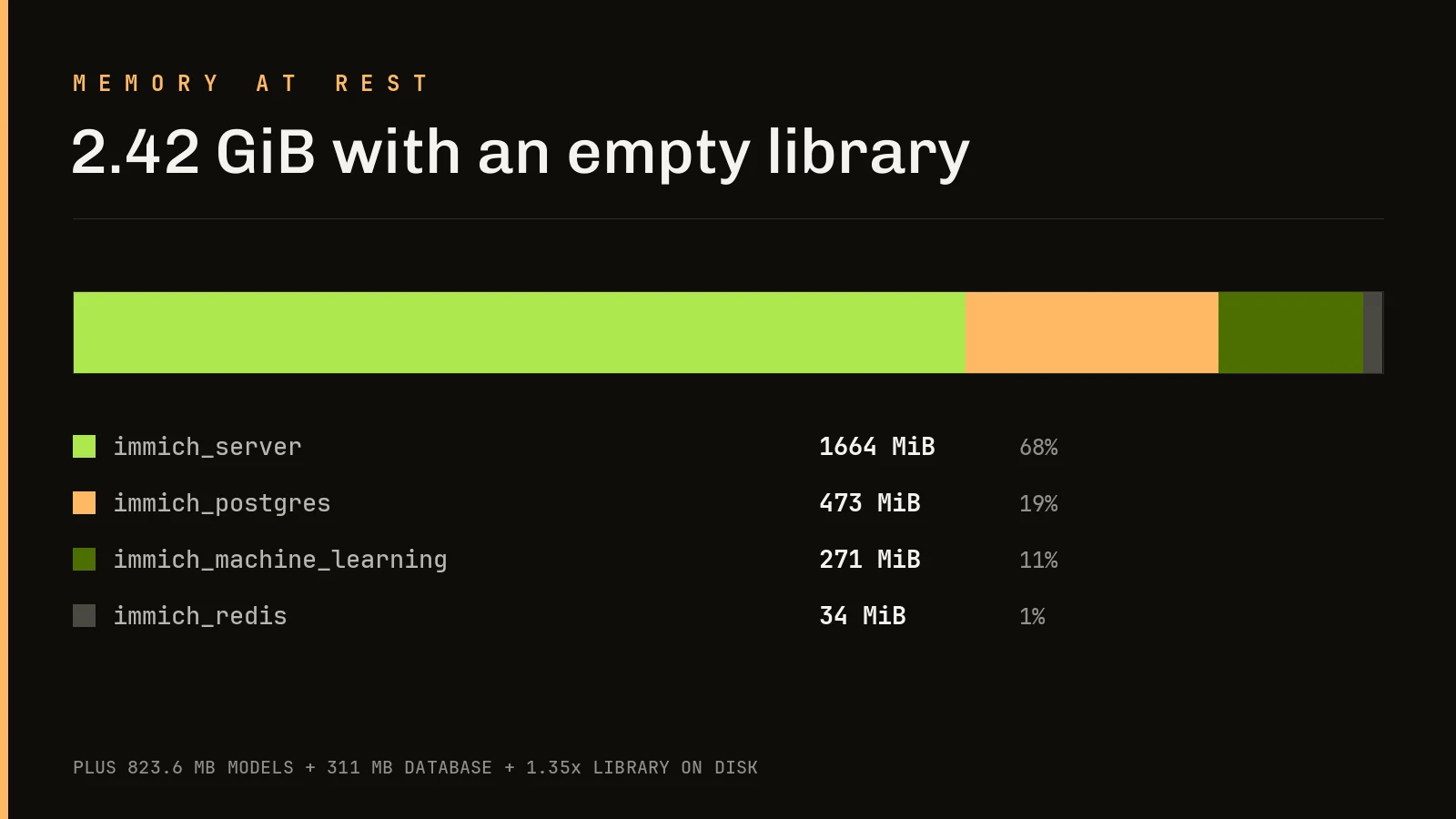
The server container alone holds 1.66 GiB with nothing whatsoever in the library.
That one figure explains the documented 6 GB minimum better than the documentation does, and it is why a 4 GB box cannot work. At 4 GB the docs tell you to disable machine learning, which removes face recognition and smart search, which is most of the reason to choose Immich at all.
Storage is the other quiet cost. 35.0 MB of originals became 366 files and 46.8 MB on disk, roughly three files per asset once thumbnails and previews exist. Budget about 1.35x your library size.
Upload and search both hold up
120 assets uploaded sequentially through the REST API in 23.9 seconds. All 120 succeeded. None failed, none duplicated. Median 0.189 seconds each.
All 120 CLIP embeddings generated. I then searched for green hills under a blue sky, a phrase appearing in no filename, tag or metadata anywhere in the library.
The API returned 100 correct matches in 1.49 seconds, and the web interface showed visually correct results. The map view clustered all 120 assets from embedded GPS, and the timeline grouped them properly by capture date.
Stability
docker compose restart brought the API back in 13.9 seconds, faster than the 24.4 second cold start, with no data loss and no intervention. Nothing crashed at any point during testing.
One correction worth recording. My first smart-search attempt hung on a spinner and I nearly wrote it up as a bug. It was not. I had built the URL as ?query=green+hills when Immich expects JSON. My error, not a defect.
Against Google Photos and OneDrive
Immich’s pitch is privacy and control. The price is that you become the operations team: no storage bill, but you own backups, updates, uptime and security.
Google’s search remains the benchmark, and Immich’s semantic search needs indexing time before it starts feeling clever.
For Microsoft-shaped readers, OneDrive is not competing on the same axis. It is excellent sync with a photo view attached, it speaks Entra ID, it is already in your tenant, and nobody maintains it at 2am. What it does not give you is face grouping, semantic search or a map view at this quality.
If you already pay for Microsoft 365 you already have the storage, and that is a genuinely strong argument for doing nothing.
Who should run it
Run it if you have a spare box with 8 GB and four cores, you want off Google Photos, and a Docker stack does not intimidate you.
Skip it if your server has 4 GB, if you already pay for Microsoft 365 or iCloud and are content, or if 3-2-1 backup is not already part of your vocabulary. Self-hosting means nobody is coming to help when the disk dies.