Jellyfin answered its API 4.9 seconds after docker compose up -d and then sat there using 140 MiB. On the same laptop, Immich wanted 2.4 GiB to do nothing.
- 4.9s
- To API ready
- 140MiB
- Idle memory
- 3.79x
- 1080p to 720p
- 3.3s
- Restart recovery
How this was tested
Third stack on the same box, so all three sets of numbers compare directly: an i5-10210U with four cores and eight threads, 7.62 GiB handed to Docker Desktop 29.6.2 on WSL2. Immich and Paperless were both stopped first.
Jellyfin 10.11.11 in a single container, with its bundled FFmpeg 7.1.4. One image, no database service, no message broker, no worker containers. That architectural simplicity is most of the story here.
Installation

The wizard opens on server name and language, pre-filled with the container hostname. From a cold docker compose up -d to this screen was under five seconds.
One image, one compose file, three bind mounts for config, cache and media. Nothing to configure before first boot and no database password to change.
- 56.2s
- Cold image pull
- 1.6s
- up -d returns
- 4.9s
- API responding
- 2.27GB
- Image size
The 4.9 seconds is not a typo. Immich took 24.4 seconds and Paperless 49.1 on the same hardware. A single process with a local database has far less to bring up than a stack carrying Postgres, Redis, a machine-learning worker and an OCR pipeline.
# Verified on Windows 11 + Docker Desktop 29.6.2 (WSL2), 9 Aug 2026
services:
  jellyfin:
    image: jellyfin/jellyfin:latest
    container_name: jellyfin
    ports:
      - "8096:8096"
    volumes:
      - ./config:/config
      - ./cache:/cache
      - ./media:/media:ro
    restart: unless-stopped
    environment:
      - TZ=Europe/London
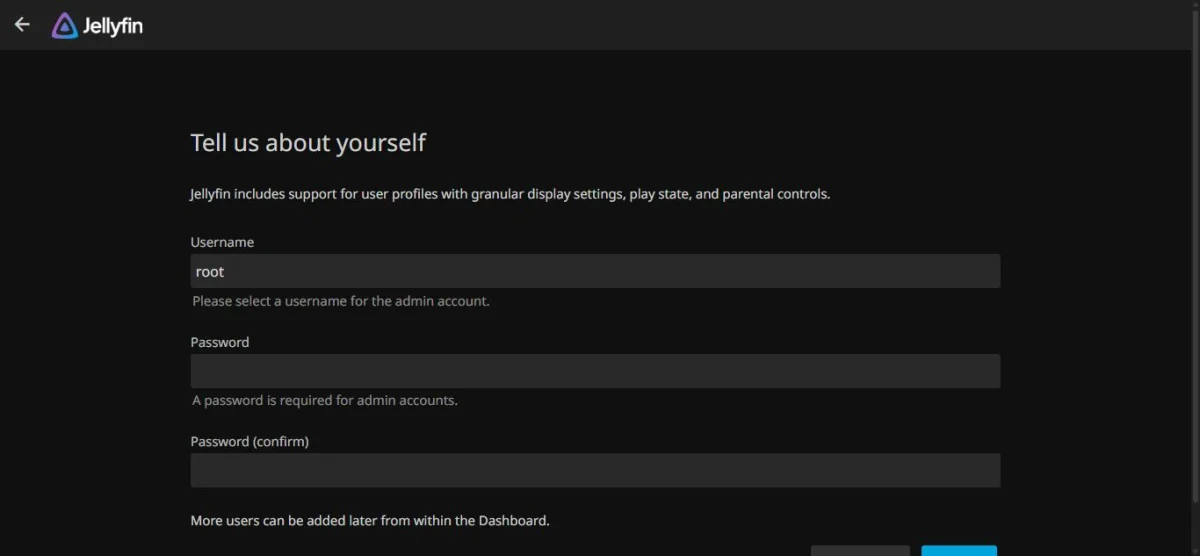
Step two is the admin account, and it is a hard gate: no part of the interface is reachable until it is filled in. That is where this test stopped, which is why the sections below cover the server and its transcode engine rather than the library experience.
Mounting the media directory read-only is worth doing. Jellyfin has no reason to write to your library, and a media server that cannot delete your films is a media server that cannot delete your films.
Transcoding on a CPU with no GPU
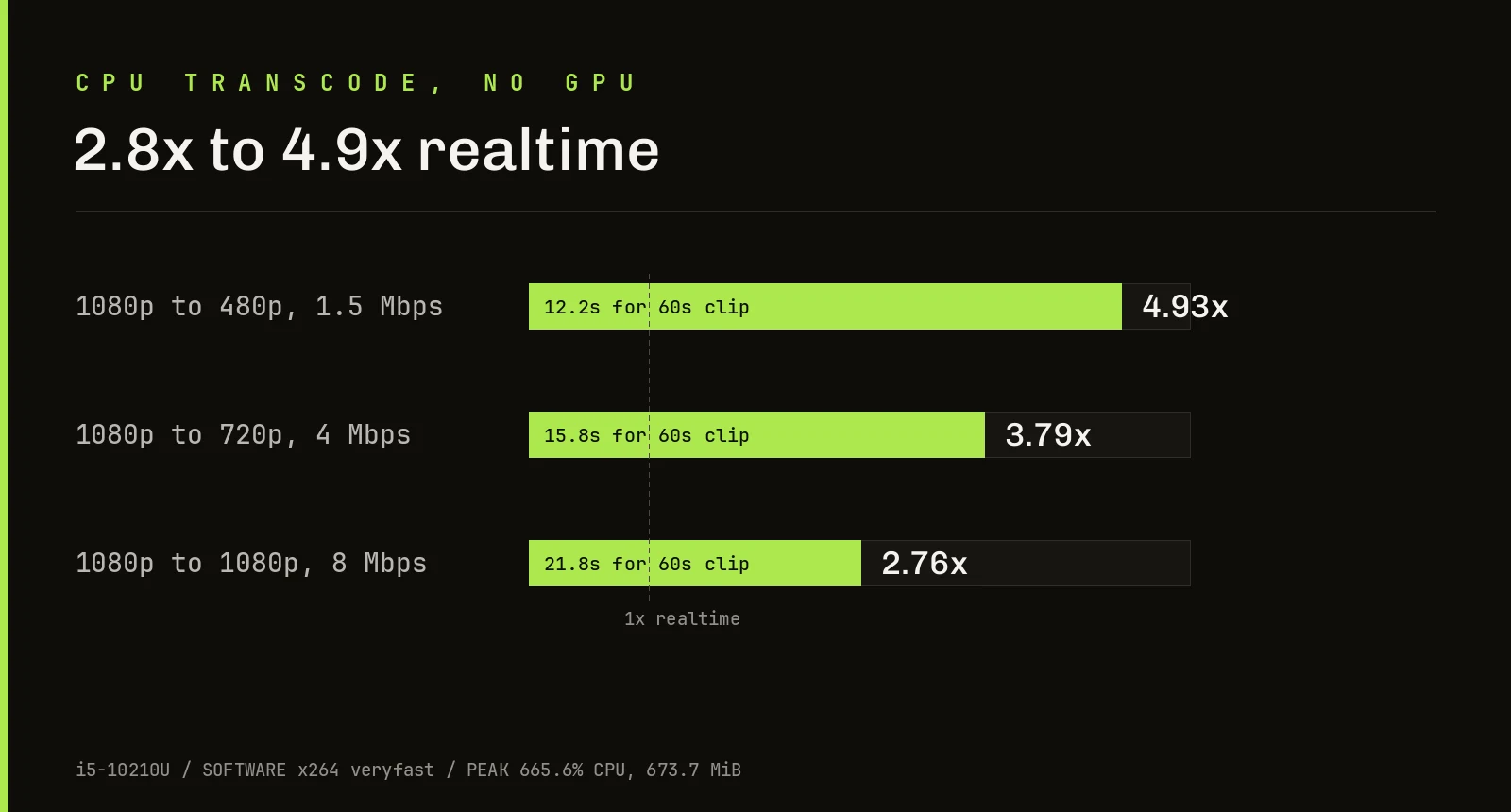
I generated a 60 second 1080p30 H.264 clip inside the container, then pushed it through the three conversions a client typically forces when it cannot direct play.
Dropping to 720p at 4 Mbps ran at 3.79x realtime. Down to 480p, 4.93x. Re-encoding at full 1080p and 8 Mbps, the heaviest case, still managed 2.76x.
Peak CPU across those runs was 665.6%, with memory topping out at 673.7 MiB. In practice that means roughly two simultaneous 1080p transcodes on this chip before headroom runs out, or three or four lighter 720p ones. Direct play, where no transcode happens at all, costs almost nothing.
This is software x264 at the veryfast preset. Quick Sync on this generation of Intel would change the picture entirely, and is the single upgrade worth pursuing if you expect several concurrent streams.
Against the other two stacks
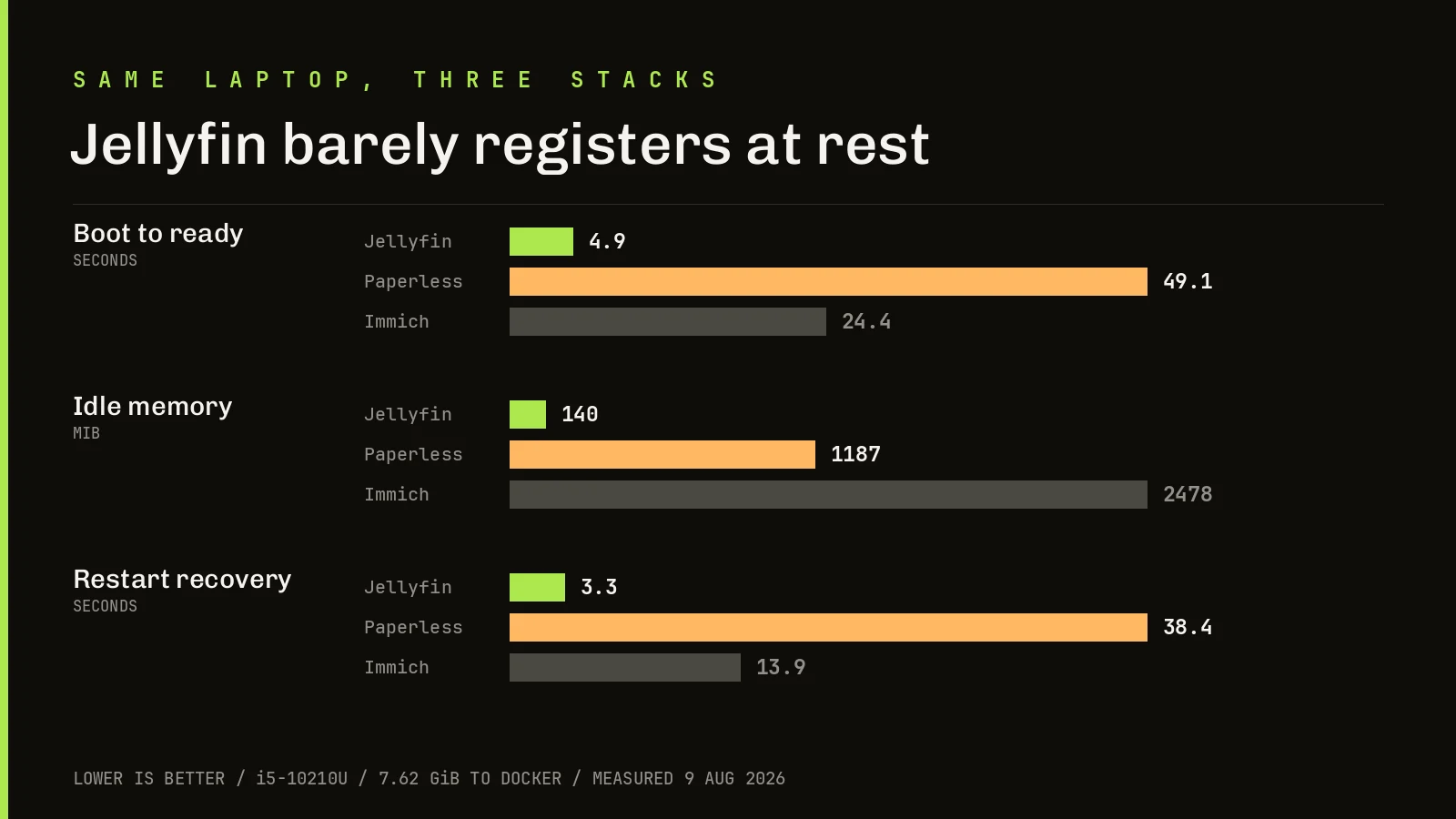
At rest, Jellyfin uses about a ninth of what Paperless needs and a small fraction of Immich. It restarts in 3.3 seconds. On a small home server it is effectively free until somebody presses play, and then it is briefly expensive.
That profile is the opposite of Immich, which holds 1.66 GiB in its server container whether or not anyone is looking at a photo.
Stability
docker compose restart had the API answering again in 3.3 seconds. The container settled back to 140.3 MiB afterwards, identical to before, and nothing needed clearing.
Who should run it
Run it if you have a media collection on a disk and want it on your TV without a subscription, and especially if your server is already doing other jobs. Its idle cost is so low that it is hard to justify not running it.
Skip it, or budget for hardware acceleration, if several people will stream transcoded video at once. A 15 watt laptop chip handles two 1080p transcodes, not six.