Every review of the UPERFECT GR16HQ repeats the same sheet: 16 inches, 2880 x 1800, OLED, 120 Hz, 100% DCI-P3. I wanted to know what the monitor actually tells Windows about itself, so I pulled its EDID off a Windows 11 laptop and decoded all three blocks. That is where the interesting parts of this monitor are, including three standards failures that change how it looks on your desk.
- 671.23MHz
- Pixel clock for 3K at 120 Hz
- 48to 120 Hz
- FreeSync range in the EDID
- 497nits
- HDR peak the panel declares
- 3
- EDID conformity failures
A naming note before anything else. UPERFECT sold this monitor as the UColor O2 until it renamed it GR16HQ, and most reviews you will find, including the larger publications, use the old name. It is the same 16 inch 3K OLED panel. The 14 inch sibling, once the UColor O2 mini, is now the GR14CU.
The test setup
The host is a Dell Latitude 5310 with a Core i5-10210U, Intel UHD Graphics on driver 31.0.101.2140, and Windows 11 Pro. It is a deliberately ordinary fleet laptop, the kind people buy a portable monitor to extend. The GR16HQ is connected over a single USB-C cable. The EDID was read from the registry, decoded with edid-decode --check, and cross-checked against what DirectX reports through dxdiag. The commands are at the end if you want to repeat this on your own unit.
What the monitor tells Windows about itself
The EDID is 384 bytes: a base block, a CTA-861 extension and a DisplayID 1.2 extension. The headline contents:
| Field | What the GR16HQ reports |
|---|---|
| Manufacturer and model | TBD, product 1, name “USBC”, serial 16843009 (0x01010101, a filler value) |
| Panel date | Week 1 of 2024 |
| Interface and depth | DisplayPort, 10 bits per colour, RGB 4:4:4 and YCbCr 4:4:4 / 4:2:2 |
| Preferred mode (base block) | 2880 x 1800 at 59.99 Hz, 337.75 MHz |
| High refresh modes | Only in the DisplayID block: 2880 x 1800 at 120 and 100 Hz, 2560 x 1600 at 120, 100 and 60 Hz |
| Variable refresh | AMD FreeSync data block, 48 to 120 Hz |
| HDR | SMPTE ST 2084 (HDR10), BT.2020 colorimetry, desired max and max frame-average luminance 496.7 nits, min 0 |
| Audio | 2 channel LPCM, 44.1 and 48 kHz, up to 24 bit |
| Physical size | 60 x 34 cm |
Two of those lines are wrong in ways that matter, and one is hiding a trap. The panel is not 60 x 34 cm, it is roughly 34.5 x 21.5 cm, and the 120 Hz modes are in a block that plenty of hardware never reads.
The spec sheet versus what the monitor says
This is the part no other review of this monitor covers, and it is the reason to read the EDID at all. On two points, UPERFECT’s own specification sheet undersells the hardware. On two more, the monitor misdescribes itself to Windows.
| Property | UPERFECT spec sheet | What the EDID declares | What it means for you |
|---|---|---|---|
| Colour depth | 1.07 billion colours, 8-bit + FRC | 10 bits per colour input | The scaler accepts a 10-bit signal. An EDID cannot prove whether the panel shows it natively or dithers, so read this as input support, not a native-panel claim. |
| Variable refresh | FreeSync: No | AMD FreeSync block, 48 to 120 Hz | A supported GPU will offer variable refresh, because the monitor asks for it. I could not test it on this laptop. |
| HDR | Yes | HDR10 (SMPTE ST 2084), BT.2020, 496.7 nits | They agree. The frame-average figure is the optimistic part. |
| Brightness | 500 cd/m² | 496.7 nits peak | They agree. |
| Size | 16 inch, 344.7 x 215.4 mm active area | 60 x 34 cm | The EDID is wrong, and Windows picks 125% scaling because of it. |
| Identity | GR16HQ | Maker TBD, name “USBC”, filler serial | The monitor does not know its own name. |
| Colour space flag | Not stated | Declares itself sRGB | False for a wide-gamut panel, so SDR looks oversaturated until you fix it. |
Where the two disagree, believe the EDID for what your GPU and Windows will try to do, and the spec sheet for what UPERFECT will stand behind under warranty. The sRGB flag matters most day to day. Windows decides how to map ordinary SDR content onto a wide-gamut panel through its Advanced Color pipeline, which Microsoft describes in Use DirectX with Advanced Color on high and standard dynamic range displays. A panel that claims to be sRGB is telling that pipeline not to bother.
Why 3K at 120 Hz depends on your laptop, in numbers
The monitor’s preferred timing is 3K at 60 Hz. The 120 Hz modes live only in the DisplayID extension, so a dock, KVM, capture card or older driver that parses the base and CTA blocks alone will never offer them. Here is what each advertised mode costs on the wire:
| Mode (from the EDID) | Pixel clock | 8-bit data rate | 10-bit data rate |
|---|---|---|---|
| 2880 x 1800 at 120 Hz | 671.23 MHz | 16.11 Gbps | 20.14 Gbps |
| 2880 x 1800 at 100 Hz | 671.23 MHz | 16.11 Gbps | 20.14 Gbps |
| 2560 x 1600 at 120 Hz | 552.75 MHz | 13.27 Gbps | 16.58 Gbps |
| 2880 x 1800 at 60 Hz | 337.75 MHz | 8.11 Gbps | 10.13 Gbps |
| 1920 x 1200 at 120 Hz | 317.00 MHz | 7.61 Gbps | 9.51 Gbps |
Look at the second row. The 3K 100 Hz mode is not a cheaper fallback. It keeps the full 671.23 MHz clock and pads the frame with 399 lines of vertical blanking, so a GPU that cannot drive 3K at 120 Hz cannot drive 3K at 100 Hz either. That is why Windows on the Latitude offered 2880 x 1800 at 60 Hz and nothing faster, while 2560 x 1600 at 100 and 120 Hz appeared straight away.
Against USB-C DisplayPort Alt Mode, the usable payloads are 17.28 Gbps for four lanes of HBR2 and 25.92 Gbps for four lanes of HBR3. 3K at 120 Hz in 8-bit fits four HBR2 lanes on paper, with 7% to spare. In 10-bit it needs HBR3. The limit on my laptop was not the link, because 2560 x 1600 at 120 Hz already needs more than two lanes can carry and it worked. It was the Comet Lake UHD Graphics display engine, which the driver will not push to a 671 MHz pixel clock.
The colour gamut its own primaries describe
The base EDID carries the panel’s red, green and blue chromaticity coordinates, and Windows passes exactly those to DirectX: red 0.6787, 0.3203, green 0.2470, 0.7089, blue 0.1347, 0.0380, white 0.3134, 0.3291 (D65). I computed coverage from those triangles in both CIE 1931 xy and the more perceptually even CIE 1976 u’v’, and did the same for the Latitude’s own AUO panel for contrast.
| Reference space | GR16HQ coverage (xy / u’v’) | GR16HQ area (u’v’) | Latitude 5310 panel coverage (u’v’) |
|---|---|---|---|
| sRGB | 100% / 100% | 144% | 51.1% |
| DCI-P3 | 100% / 100% | 115% | 40.9% |
| Adobe RGB | 94.3% / 98.0% | 124% | 44.0% |
| BT.2020 | 78.4% / 82.4% | 84% | 29.8% |
Treat that as what the panel claims, not a colorimeter reading. EDID primaries are written at the factory and are often typical values for the panel model rather than this unit. They are, however, the values Windows colour management works from, and they are consistent with the 100% DCI-P3 on the box. The green primary sits outside P3 altogether, which is why the Adobe RGB figure is higher than you would expect from a P3 panel.
Failure one: it says it is sRGB when it is not
edid-decode fails the base block with “sRGB is signaled, but the chromaticities do not match”. The monitor sets the flag telling the host its default colour space is sRGB, then reports primaries covering 144% of sRGB’s area.
In practice that means anything sent to it as plain sRGB, which is most of Windows, the web and Office, is stretched across a much wider gamut. Reds and skin tones come out hot and greens go neon. It looks vivid in a shop and wrong the first time you open a photo you know. DirectX confirmed the desktop was running as DXGI_COLOR_SPACE_RGB_FULL_G22_NONE_P709, plain SDR sRGB, on this panel.
There are two fixes, both built into Windows 11, and the registry on this laptop shows the GR16HQ is eligible for the first (AutoColorManagementSupported = 1):
- Auto Color Management. Settings, System, Display, select the GR16HQ, then turn on Automatically manage color for apps. Windows then maps sRGB content into the panel’s real primaries.
- HDR mode. Turning on Use HDR for this display also puts the desktop into a managed colour space, at the cost of SDR looking slightly flatter until you set the SDR brightness slider.
Failure two: Windows thinks it is a 27 inch screen
The EDID declares a 60 x 34 cm image, the size of a 27 inch monitor. Windows uses that size to pick default scaling, and it picked 125% for a panel that is really 16 inches at 212 pixels per inch. At 125% text is small enough that most people will squint before they find the setting. Set it to 150% by hand, which gives the working area of a 1920 x 1200 display, or 175% if it sits further away than your laptop screen.
The same wrong size will mislead anything that computes physical DPI from the EDID, including some remote desktop clients and a few Linux desktops, which is worth knowing if you run this off something other than Windows.
Failure three: no real identity
The manufacturer code is TBD, the model is 1, the name is “USBC” and the serial is a filler value, while the separate product serial string is empty. edid-decode flags the serial fields as inconsistent. Windows lists the monitor as “Generic Monitor (USBC)”. I cover what that does to asset inventory further down.
HDR: what it declares, and what to expect
DirectX reports HDR Supported (BT2020RGB BT2020YCC Eotf2084Supported) and AdvancedColorSupported, so the Use HDR toggle appears on the Latitude. The HDR static metadata block declares a desired peak of 496.7 nits and gives the same 496.7 nits as the maximum frame-average luminance.
That second number is optimistic for any OLED. OLED panels limit brightness when a large area is bright, so a full white window will not reach the same level as a small highlight. Because the panel tells Windows it can hold 497 nits across the whole frame, Windows and games will not tone-map bright scenes down for it, and the panel’s own brightness limiter does that instead. Expect bright, mostly-white HDR scenes to dim a little as they settle. Highlights in a dark scene are where this monitor looks best.
FreeSync, and why this Comet Lake laptop cannot use it
The CTA block contains an AMD FreeSync data block declaring 48 to 120 Hz, and the base block marks the display as continuous frequency. That is a proper variable refresh range with a 2.5 to 1 ratio, enough for frame doubling when a game drops below 48 fps. Intel added Adaptive-Sync with its Gen11 graphics in Ice Lake. The Latitude’s Comet Lake chip still uses the older Gen9.5 UHD Graphics, so there it simply is not offered. On a recent AMD or Intel laptop, or a desktop GPU, you get tear-free gaming from 48 to 120 Hz.
Everything else, briefly
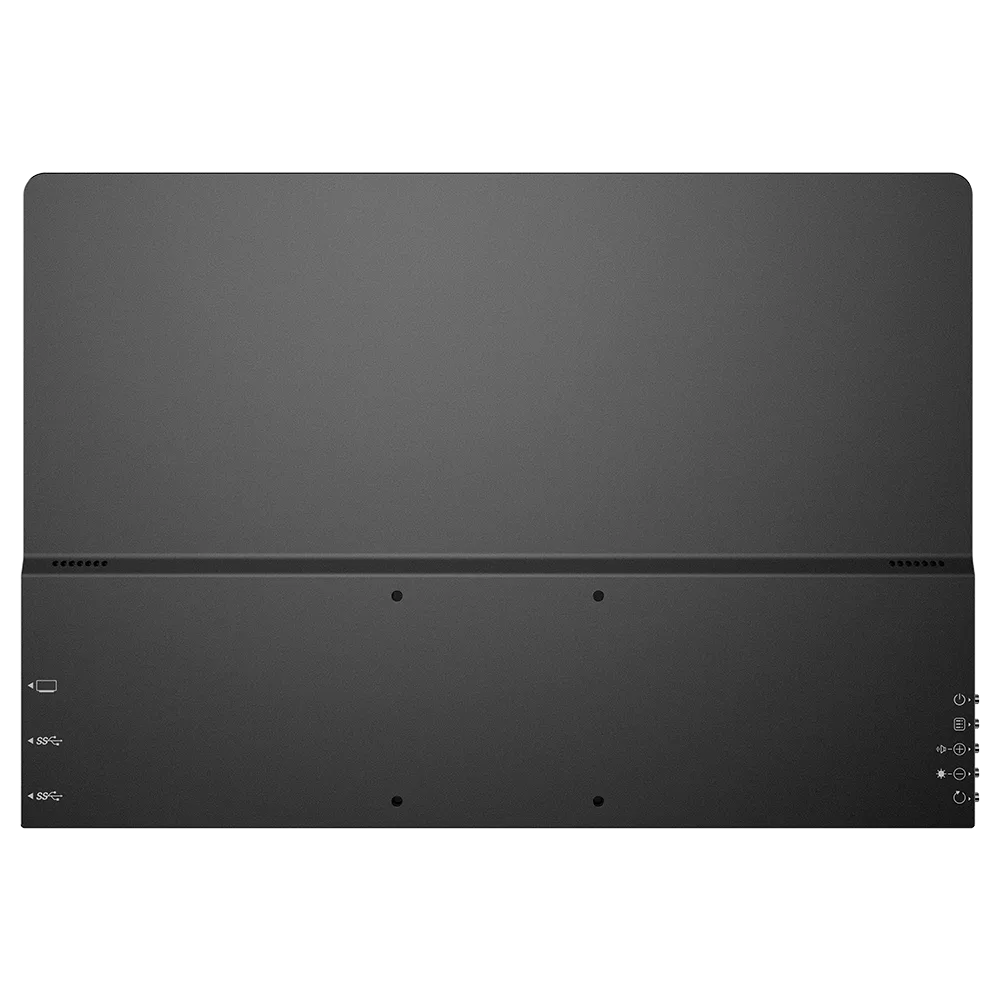
One USB-C cable carries picture and sound with no driver. The speakers appear in Windows as a separate endpoint, “USBC (Intel Display Audio)”, and the EDID limits them to two channels at 48 kHz, which is fine for a call and nothing more. The shell is aluminium, 0.72 kg, with 75 x 75 mm VESA holes that let it live on a monitor arm between trips. Power is rated at 16 W, and the second USB-C port takes the supplied PD adapter so the laptop is not powering the panel on its own.
The standard box has the monitor, two USB-C cables, a mini-HDMI to HDMI cable, a PD adapter and a manual. There is no stand. Over mini-HDMI UPERFECT quotes 3K at 75 Hz or 2K at 120 Hz, and the CTA block lists 1920 x 1080 at 120 Hz as a standard TV timing, so a console at 1080p 120 will find it without any custom resolution.
If you manage a fleet
Because the GR16HQ reports manufacturer TBD, a filler serial and the name “USBC”, a WMI or Intune peripheral inventory cannot tell it apart from any other cheap panel using the same scaler firmware. If you issue these to staff, record the serial from the label at hand-over, because the device will never tell you. This is the query I use to spot them on a Windows endpoint:
# List connected monitors and flag unbranded panels that report maker TBD
Get-CimInstance -Namespace root\wmi -ClassName WmiMonitorID | ForEach-Object {
$name = -join ($_.UserFriendlyName | Where-Object { $_ } | ForEach-Object { [char]$_ })
$mfr = -join ($_.ManufacturerName | Where-Object { $_ } | ForEach-Object { [char]$_ })
[pscustomobject]@{ Maker = $mfr; Name = $name; Year = $_.YearOfManufacture; Instance = $_.InstanceName }
} | Where-Object { $_.Maker -eq 'TBD' }
Anything that comes back with maker TBD is an unbranded or rebadged panel, and this one will show as TBD, USBC, 2024. For what Intune itself can and cannot pull from a Windows device, the limits of Intune device query are the next thing to read.
Reproduce this on your own unit
This dumps the raw EDID of the connected GR16HQ to a file. Run it in PowerShell on the machine the monitor is plugged into:
# Dump the raw EDID of the connected GR16HQ to a file in your profile folder
$key = Get-ChildItem 'HKLM:\SYSTEM\CurrentControlSet\Enum\DISPLAY\TBD0001' | Select-Object -First 1
$edid = (Get-ItemProperty "$($key.PSPath)\Device Parameters").EDID
[IO.File]::WriteAllBytes("$env:USERPROFILE\gr16hq-edid.bin", $edid)
$edid.Length # 384 on this monitor
Then decode it with edid-decode --check gr16hq-edid.bin in WSL or any Linux box. For what Windows makes of it, run dxdiag /t dx.txt and search the file for Color Primaries, Display Luminance and Monitor Capabilities. If your unit reports different primaries or luminance from mine, UPERFECT has changed the panel or firmware, and I would like to hear about it.
Where it wobbled
The EDID is the weak point of an otherwise excellent panel. The false sRGB flag makes it oversaturated out of the box until you turn on Auto Color Management, the false 27 inch size gives you the wrong default scaling, and putting the 120 Hz modes only in DisplayID makes high refresh fragile through docks and adapters. None of that is visible on a spec sheet, and all of it is fixable in firmware. Separately, a monitor at this price without a stand in the standard box is an odd economy.
What it costs, and what you are covered for
At the time of writing UPERFECT lists the GR16HQ at $499.99, down from a $729.99 list price, with a stand bundle sold separately. It carries a 2-year warranty and a 60-day risk-free trial. That trial is the most useful number on the page, because it is long enough to test the two things this review could not: variable refresh on a supported GPU, and how the panel copes with your own static layout over weeks rather than a day.
For the money you are buying the panel: OLED contrast and a genuinely wide gamut in 0.72 kg. You are not buying a tidy EDID or a stand, and the standard box has neither. If your laptop cannot drive 3K at 120 Hz, check the table above before paying for refresh you will never see.
Who should buy it
Buy the UPERFECT GR16HQ if you want a portable second screen with real contrast and a wide gamut, and you are happy to spend two minutes on Windows colour and scaling settings. Buy it for 3K at 120 Hz only if your laptop has a recent GPU and a DisplayPort 1.4 capable USB-C or Thunderbolt port, plugged in directly. On an older business laptop it is still a superb 3K 60 Hz monitor.
Skip it if you need colour-critical SDR work without touching settings, or if everything you own goes through a two-lane USB-C dock.
It lists at $729.99 and was $499.99 on UPERFECT’s store at the time of writing. One quirk of the pricing is worth knowing. The code GR60 takes $60 off orders over $400, and GR80 takes $80 off orders over $500. The “16 inch + Stand” bundle at $509.99 clears the $500 threshold, so with GR80 it works out at $429.99, which is less than the monitor on its own with GR60 at $439.99. Since the standard box has no stand at all, that is the version I would buy.